SpamExperts SPAM Protection
Protecting your inbox from spam making you more productive

It seems that spam has become a fact of life on the Internet and without the correct protection, your mailbox can soon be flooded with spam. To improve our customers mail service we've invested in powerful SpamExperts M247 Anti-Spam hardware, our SpamExperts M247 appliances are dedicated servers that sit infront of your mailbox protecting your email from incoming Spam and Viruses, a spam free mailbox saves you the time deleting junk making your work time more productive.
Dedicated Anti-Spam Hardware
We have multiple SpamExperts M247 appliances setup for peformance and to provide redundancy, this means you have two MX records for your web hosting account so in the event of one of the SpamExperts M247 appliances failing, email is sent to the next SpamExperts so you don't loose your email.
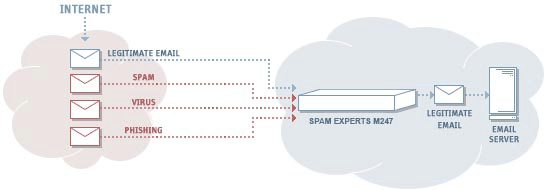
SpamExperts's MessageIQ scan engine uses a layered approach that maximizes kill rates and minimizes false positives by not using 'scoring' or rating systems for identifying spam - those systems are plagued by high false positive rates and are really only 'guessing' at spam.
The core layer for threat identification are the spam signature files, these signatures are created and managed by human spam editors who look at spam 24x7x365. SpamExperts release new spam updates every 5 minutes to ensure that our hardware has the latest rule sets to defeat spam attacks as they happen.
SpamExperts's spam signatures are designed around actual identified spam. The system isn't guessing at identifying incoming email which is why the false positives are the lowest in the industry.
Why SpamExperts?

|
TrustedSpamExperts's anti-spam engine, "MessageIQ" was designed from the ground up to protect your message while taking care of spam, viruses and other email threats. |

|
ProvenFor over four years SpamExperts has been eliminating spam from email for over 2 million mailboxes world-wide. |

|
EffectiveSpamExperts is very effective at killing spam, but the real benefit is in our false positive rates. We lead the industry with a false positive rate of less than 1 in 1 million. Some customers have seen only one false positive in over four years of service. |

|
Ease of UseSpamExperts is a 'hands off' system meaning that administrators and end users are not spending time managing the system for rule creation, etc. |
What happens to the SPAM?
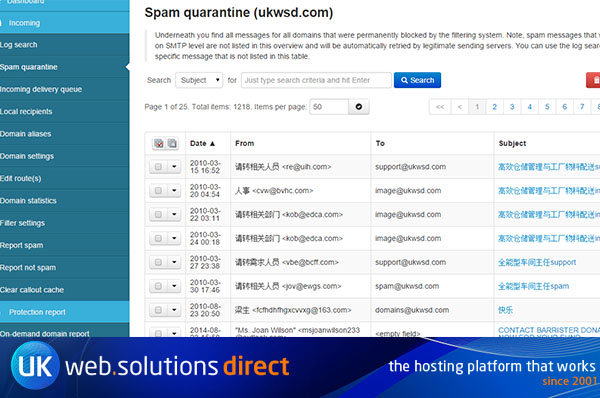
If an email is flagged as Spam it's not deleted but held on the SpamExperts for 15 days. You will be sent an email digest at 5am each morning which will contain a list of the emails that have been filtered out by the SpamExperts system, this should contain 100% pure spam but gives you the option to read the emails and release them to your inbox if required.